Comparison / LogMeIn
A LogMeIn alternative when the renewal changes the calculation
If a LogMeIn remote access renewal costs more than you expected, start with the product and the unit on the bill. Remote Login offers published monthly technician seats. Compare those with LogMeIn Pro, Rescue, Central and GoToMyPC before deciding what to replace.
Remote Login
Why people look for a LogMeIn alternative
A renewal increase is a practical reason to review remote access. Compare the renewal notice with the previous invoice: product, computer allowance, technicians, additions, discount and payment period. If the amount changed during a contract, ask the vendor to explain the change against that agreement. A different total does not establish which item caused it.
LogMeIn Pro, LogMeIn Rescue, LogMeIn Central and GoToMyPC belong to GoTo’s product family, but they are not one subscription. Pro and GoToMyPC serve access to your computers. Rescue is a technician support product. Central adds endpoint management. Moving between those names changes more than the logo.
Start with the official pages for LogMeIn Pro, Rescue pricing, Central pricing and GoToMyPC pricing. Confirm the offer and renewal terms for the exact product you already use. A first-term promotion does not establish the next invoice.
We do not claim that every customer receives the same increase or repeat an unsupported historical percentage. Your renewal quote is the relevant comparison. Remote Login’s alternative is explicit monthly seat arithmetic, not a promise that our prices can never change.
Before that renewal date, decide which capabilities you must retain. Someone reaching two office PCs has a different requirement from a support desk helping unfamiliar customers or an IT team maintaining a hundred endpoints.
Figures and licensing checked 22 September 2026 · Owner: Houston IT Developers LLC · Next review: 22 December 2026.
Sources: LogMeIn official pricing. USD before tax; promotions and regional offers may differ.
Remote Login
LogMeIn and Remote Login, side by side
| Question | LogMeIn | Remote Login |
|---|---|---|
| What is the licensing unit? | Pro and GoToMyPC scale by computers; Rescue licenses technician support; Central scales by managed computers and package. | Named technician seats; monthly prices. |
| What is the published starting point for this comparison? | Product, capacity and billing period determine the price. Confirm the current offer and renewal quote. | Starter $25, Agency $45, Pro $75 per technician/month. |
| How should I compare device capacity? | Use the allowance in the exact selected plan. | 100 devices/Starter seat; 250/Agency seat; unlimited/Pro seat. |
| What about client organizations? | Verify the required separation and workflow in the chosen edition. | One on Starter; unlimited on Agency and Pro. |
| What about branding? | Check the relevant edition and each customer-facing surface. | Branding on Agency; full white-label on Pro, with disclosed limits. |
| Can this control an iPhone? | Third-party control is constrained by iOS; distinguish viewing from input. | iOS screen sharing is not built; no remote touch input. |
The table names the decisions a buyer must verify. A blank assumption should not be converted into a “no” in the competitor’s column. Edition-dependent capabilities need the actual plan, and technical requirements need a real device test.
Keep the completed comparison with the evaluation notes. Record which plan was quoted, when it was checked and which requirements remained unresolved. That gives the eventual buyer a decision they can review, instead of a screenshot of a headline price with the important conditions cropped away.
For the OS side, use the published platform capability matrix. For the support experience, review our remote support platform and ask each vendor to show the person-at-the-device view as well as the console.
Figures and licensing checked 22 September 2026 · Owner: Houston IT Developers LLC · Next review: 22 December 2026.
Sources: LogMeIn official pricing. USD before tax; promotions and regional offers may differ.
Remote Login
Where LogMeIn is genuinely the better choice
LogMeIn Rescue’s attended-support tooling is mature. Its published feature list includes in-session diagnostics, technician collaboration and scripting. If your support desk depends on those workflows, test them explicitly before changing tools. Remote Login does not claim to reproduce the entire Rescue console.
LogMeIn Central bundles monitoring and patch-management capabilities that Remote Login does not have at all. Confirm the chosen package, but do not treat an access-only subscription as a replacement for those jobs. Keeping or replacing the management layer has its own cost.
Pro or GoToMyPC may also remain a good fit when someone simply needs familiar access to a few computers. A working setup, known printing workflow or established deployment can be worth keeping. A renewal review should consider the time spent changing it as well as the new subscription.
If your current service already meets the requirement at a price you accept, staying is a reasonable result of the comparison.
Remote Login
What switching actually involves
Identify the installed product first. A Rescue support workflow is not a fleet of Pro computers, and a Central deployment may be doing maintenance between remote sessions. Record which duties would stop if you removed each agent. Ask the people doing the work rather than relying only on the purchase order.
Pilot the access tasks on a representative group before the renewal decision. Include an office desktop, a remote laptop and the operating systems you depend on. If you are evaluating a GoToMyPC alternative, test the application and file workflow you use every day.
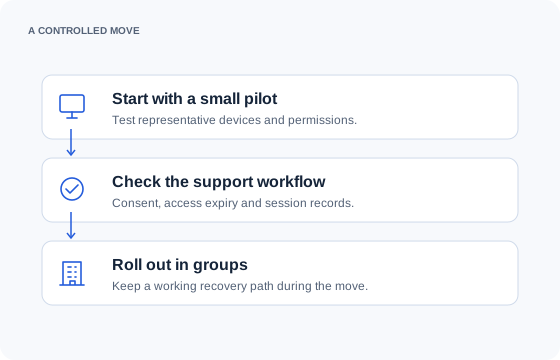
Keep management and access changes separate where possible. Preserve the records you need and maintain the existing recovery route during the pilot. There is no advertised import of LogMeIn agents, Central policies or Rescue history into Remote Login.
Treat the change as a controlled pilot with a way back. The devices belong to a customer or employer, and installing another access path changes who can reach them. Tell the responsible people what is changing, who authorizes it and how they can identify a legitimate session.
Before committing, read the setup, session and record flow and the security model. Providers should also check the multi-client organization model and the actual white-label scope.
Remote Login
What it would cost you
One Starter technician is $25 monthly for 100 devices in one organization. Three Agency technicians cost $135 monthly, with capacity for 750 devices across unlimited organizations. Those are Remote Login calculations, not claims that the same inputs identify an equivalent GoTo package.
Pro packages include a computer allowance, and GoToMyPC pricing depends on the computers covered. Rescue uses technician support licensing; verify the current entitlement and required additions in the quote. Central combines computer capacity with package choices. Check annual payment, any promotional period and the renewal total separately.
A cheaper remote connection does not replace monitoring or patching. Add the tools you would retain to the new access subscription before calling the difference a saving.
Use our seat calculator for the Remote Login side. It shows the lowest-priced plan that fits exactly the selected number of technicians, device count and organization choice. Required feature entitlements can still lead you to a different tier.
Include the overlap between subscriptions, deployment time and technician familiarisation in a migration budget. These are ordinary costs of changing a business tool, even when the replacement’s monthly subscription is lower.
For all vendors together, see the dated pricing comparison. The operator behind Remote Login is Houston IT Developers LLC in Houston, Texas; we publish these comparisons so a buyer can check the arithmetic and the limits.
Figures and licensing checked 22 September 2026 · Owner: Houston IT Developers LLC · Next review: 22 December 2026.
Sources: LogMeIn official pricing. USD before tax; promotions and regional offers may differ.
Questions, answered
Questions about moving from LogMeIn
Is Remote Login a direct replacement for every LogMeIn feature?
No. Remote Login is a focused remote support and access platform. List the features your team actually depends on, including integrations and administration workflows, then evaluate those requirements explicitly. A successful remote desktop connection alone does not establish full product parity.
Will switching stop all future renewal increases?
No vendor’s current price proves that it will never change. Remote Login publishes monthly seat prices, included capacity and no minimum term. Compare that commitment with your actual renewal offer, and include migration costs before deciding whether a switch makes sense.
Can we move the whole fleet in one step?
A staged rollout is more useful than an untested fleet cutover. Begin with representative devices and client organizations, verify permissions and records, and keep a recovery route until the replacement works. No one-click migration of agents or historical audit data is advertised.
Will changing vendors give us full iPhone control?
No third-party support platform gains system-wide iPhone input privileges merely by replacing another app. Read why iOS viewing and control are different, including the separate Apple FaceTime feature, before promising a mobile support capability.
What should the pilot prove?
Prove the enrolled device is in the correct organization, the technician has the intended permissions, the supported inputs work and the customer sees a clear session. Test decline, expiry and revocation as well as acceptance. Finally, inspect the record that remains.
Get started
See how it fits your team.
Tell us how many technicians you have and which platforms you support. We will help you check the fit.